WiFi frustration on vacation? It doesn’t have to be that way, we think.
WiFi frustration on vacation? It doesn’t have to be that way—at least, not necessarily.
Summer is here, and with it, a well-deserved vacation. You’ve been looking forward to 14 days in Fiji or the Maldives for months, smiling smugly at the thought of how photogenic those pictures of flour-white palm beaches and sparkling turquoise surf will spice up your Facebook profile. If Grandma misses her dear grandchildren, you can always video chat for a bit—there’s free WiFi!
But haven’t you also experienced that reality on the ground looks a bit different? In paradise resorts, especially far from civilization, free WiFi is standard, but the speed often leaves much to be desired. Even on the plane, even in the latest A380, the connection might run quite well at first, but over time it starts to falter. You’d rather download that email image attachment later after all.
Arriving at the hotel, you’re standing in line at the check-in counter. An ideal moment—before it’s your turn, you send a first snapshot to your loved ones back home, post on Facebook or Instagram, or check the World Cup scores. Unfortunately, no luck: the spinner (that little circle, donut, or other moving element that shows us the waiting time) spins forever, but the page remains white. No chance.
That’s annoying, but let’s be honest—WiFi on a plane—aren’t we all a bit spoiled? Back home, with fiber optics in every house and a dial-up node two blocks away, such problems hardly exist. But at 10,000 m altitude over the ocean, or in a paradise bay on the smallest Seychelles island far from any urban civilization… where do they actually get internet from anyway?
Where does the internet under the palm trees come from?
The internet connection that a hotel or any other business needs to offer “free WiFi” is referred to by technicians as an uplink. The hotel industry obtains this uplink from telecommunications or specialized broadband providers via fiber optic or, if not available, copper cables. You’ve probably guessed it: fiber optic cable is by far the most powerful. But copper isn’t bad either—if it reaches as far as the hotel is located.
The most beautiful locations for the holiday hotel industry are not necessarily city centers, but often scenic areas in the mountains, in nature parks, and so on. The more isolated the zone, the more often a radio network must bridge the gap from the end of the underground cable to the tourist resort.
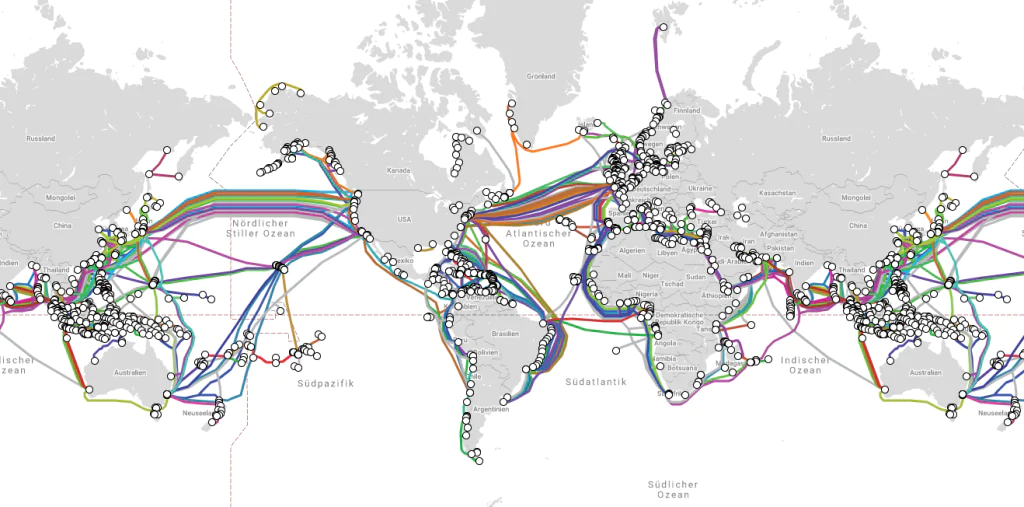
And what about islands? Larger ones are often connected via undersea cables—here is an interesting map of them. For atolls, the cable usually only reaches the main island; after that, a radio network has to step in again—or a satellite, just like on a plane. However, that is a fairly expensive matter, and the bandwidth is limited.
Since 2020, there has also been the first non-wired internet access, with which Elon Musk’s company SpaceX aims to provide high-speed internet worldwide in several expansion stages. Currently already available in many countries, the costs are still quite high, and not everyone wants to or can set up a satellite dish and wire it from outside to inside with a router. The higher latencies are also a problem for some internet applications, so it is (not yet) very likely that we, as guests, will go online via this network during a typical hotel stay.

Furthermore, quite a few satellites are still needed for the planned worldwide coverage. Individual Starlink caravans can now be observed in the night sky; several thousand are already in space.
According to Musk’s plans, there should be 30,000. Critics complain about the increasing littering of space, the consequences of which we cannot yet estimate, as well as the concentration of power for such a communication infrastructure in the hands of a private individual.
Why is it stuttering and lagging?
Perhaps such power-political or ethical questions concern us less as users; it’s more about functionality. Aren’t these all data highways already? In part, yes, but just like rush hour on the highway, things can get tight in the satellite network or even in the most powerful cable when everyone is on the move at the same time. In the narrower copper cable alleys and at the intersections between technologies, nothing may move at all. This last piece of the path that the connection travels from the fiber optic highway to you and your device is what technicians like to call the last mile.
You’ve already guessed it: this last mile also includes your free WiFi at the hotel. Well, and during the peak holiday season, it is of course booked up to the last room; moreover, all the other vacationers have the same idea as you: showing friends and relatives how great it is here.
But don’t panic—you can do something: Here are our tips on how to keep your vacation from turning into an internet fiasco.
The WiFi Survival Guide for Smart Travelers
1. Timing is everything.
Avoid peak times. By far the most common problems with slow connections result from timeouts—it simply takes too long for your device to get a response to a web request, and it therefore issues an error message. The best solution: Surf when there’s not much going on! Observe when most guests in the house are playing with their phones and avoid those times. Go to breakfast or dinner very early or very late, and handle your emails while the other guests are eating. The fewer people on the network, the more bandwidth there is for you. Do you like to stay up late? Perfect; when everyone is asleep, night owls have a clear path.
2. The right location.
WiFi is influenced by various factors. It is a radio technology. The signals used can go through walls, but they also bounce off certain surfaces and can be absorbed by people and materials. Sometimes you have perfect reception in a certain spot, sometimes not. Walk around to see where the signal is strongest. But note: you can have a perfect signal and still have no internet connection: see #3.
3. On/Off relationship
The WiFi signal is good, but you’re still offline? Then you should first open the browser—just tap the Chrome/Explorer/etc. icon on your smartphone, try to load any page (such as your favorite news site), and just wait to see what happens. In most hotels, a login page is displayed where you can enter the access data you received at check-in. Usually, you will find instructions on what to do next to gain access. If the attempt fails, close the browser, open it again, and try a different website. You can also deactivate WiFi on your phone and turn it back on. This can fix the redirection problem and bring you to the correct login page.
4. Use the departure day.
In most resorts, there are specific arrival and departure days (often Saturday, but feel free to ask at reception). A whole group is standing at the counter checking out? It will take a while until the rooms are cleaned and occupied again; the next arrivals aren’t for a few hours. Go for it—board the WiFi!
5. It’s all a matter of settings.
Depending on how many apps are active, your smartphone establishes several data connections simultaneously in the background. This can strain and slow down web access, especially when updates are involved. On most devices, these updates are downloaded automatically, which usually goes completely unnoticed by us.
Deactivate a few apps, or at least the automatic updates. If absolutely necessary, let them run at night—that way you’ll have a freshly upgraded device when you wake up, and surfing will be smoother during the day.
On Android devices, automatic app updates can be deactivated via the Google Play Store in the Settings menu. On Apple devices, scroll down in the Settings menu to the iTunes & App Store menu and deactivate automatic updates there.
6. Be nice to the crew.
Most hotels do everything they can to ensure that you, as a demanding guest, have a functioning internet connection. They buy great software with bandwidth management like IACBOX, equip indoor and outdoor areas with good hardware coverage, etc. But if the cable connection is currently drowning in tropical rain, the controller loses its configuration due to a power outage, or a thunderstorm knocks out the radio antenna, they need time to fix everything. The nearest network specialist is sometimes hundreds of kilometers away.
Conclusion: The staff usually can’t help it if the connection is poor or the network is overloaded, and we should also treat management with mercy if we can’t log in for once. Furthermore, the uplink or the technology in the house isn’t always to blame. Yes, exactly—user errors are also common. It could be the wrong email address, a wrong password, or just a typo. The smartphone itself is rarely the reason for a failed login, but unfavorable settings (e.g., Javascript deactivated) can certainly be responsible if it just won’t work.
But a receptionist cannot be an expert in that—better to ask people when the fewest guests are online. With a bit of luck, they will know this from the WiFi software analytics. And then try to log in again.
7. Buy a premium package.
Some hotels and clubs offer paid WiFi packages with higher bandwidth. A good thing if you have to work every now and then while on vacation. Inquire at reception, and if there is a ticket with guaranteed bandwidth, then go for it. But be careful—in the event of a technical defect, even the VIP ticket won’t help, and avoiding the digital rush hour is still recommended.
8. Please do not disturb.
And if the WiFi fails completely? Just let it be and enjoy the digital peace—nowadays there are tourist offers where expensive money is paid for offline time. After all, this is your long-awaited vacation! Email stress and communication overkill will catch up with you soon enough afterward. For now, go snorkeling, hiking, archery, or enjoy the sun with your loved ones.
Have a great vacation! We’re off then.