Network basics: DNS and why it makes our filter work better
We software developers like to use plenty of abbreviations in our field when discussing computer and network topics—sometimes so extensively that the original term disappears from our vocabulary altogether. While we find this language perfectly understandable, it often isn’t suitable for everyday use once we leave the developer office, especially when we want to explain exactly what we did in our latest update. Today we want to do better and shed some light on how differently humans and machines read website addresses: domains and IP addresses.
DN… what?
DNS stands for Domain Name Service. This service works invisibly in the background, yet it is a key component of the internet and how we use it every day. When we visit a website, we use an address that is easy for us to read and remember, such as www.example.com. For this address to become readable for machines, it must be translated into a numeric Internet Protocol, or IP, address such as 203.0.113.51. Before the browser can retrieve a webpage’s content, this translation of the domain name must take place.
This is exactly where our newest feature comes in, which we’re excited to introduce today: our brand-new DNS-based web filter.
Hold on… is something wrong with the content filter?
Our current content filter is based on a transparent HTTP proxy. It works without issue for unencrypted traffic. Recently, however, as you’ve probably noticed, more and more websites are using the secure version of the Hyper Text Transfer Protocol, HTTPS. This means that all communication between the browser and the web server is encrypted via the TLS protocol. As a result, the HTTP proxy can no longer search for unwanted content and therefore cannot block it either—this is where our new DNS filter comes to the rescue.
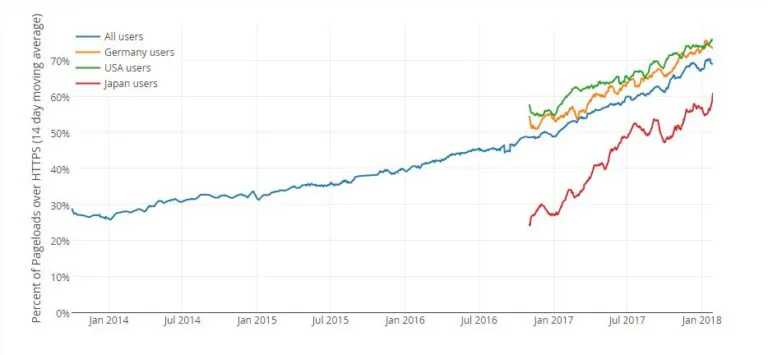
Just at the right time, too: in addition to the general trend toward greater security on the web, the Let’s Encrypt initiative—which provides free SSL/TLS certificates—is also driving more and more sites to switch to HTTPS. Let’s Encrypt has already issued millions of certificates, and as of today (01/2018), 48 million of them are already active online.
Our chart shows the percentage of encrypted pages (Firefox users). The blue line represents all users and currently stands at around 70%. A significant share of this comes from leading platforms such as Google, Facebook, and others, which are fully encrypted
Great, can I start using the DNS filter right away?
This new feature is available on any current IACBOX running version 17.2, provided the system has at least 4GB of memory. This is required because the entire filter list is loaded into memory to guarantee the best possible performance.
How does the DNS filter work?
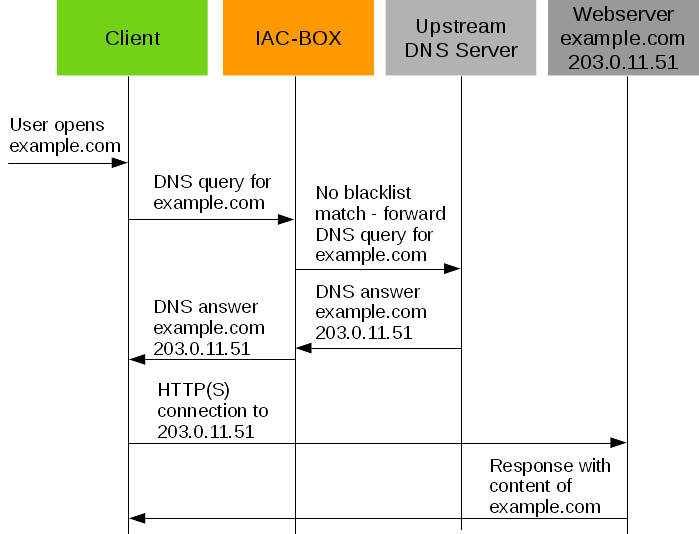
Instead of filtering HTTP connections and content, DNS requests for websites on the blacklist are blocked. The DNS filter always works, regardless of which protocol is used to send or receive data.
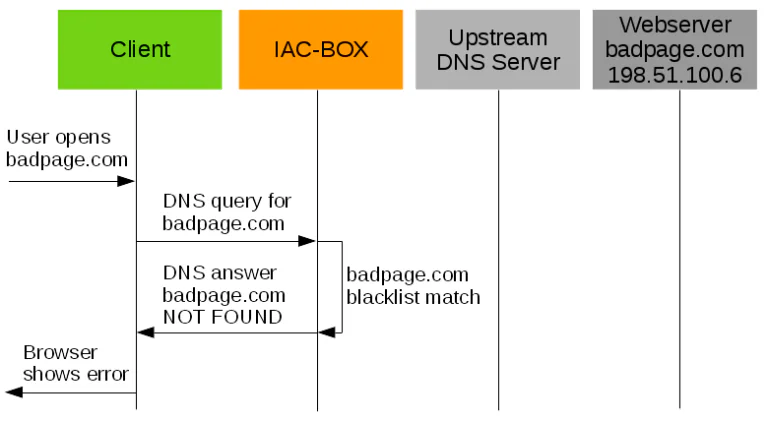
If an entry is found in the blacklist for the requested domain, the DNS filter returns a response indicating that this domain does not exist.
End-user communication
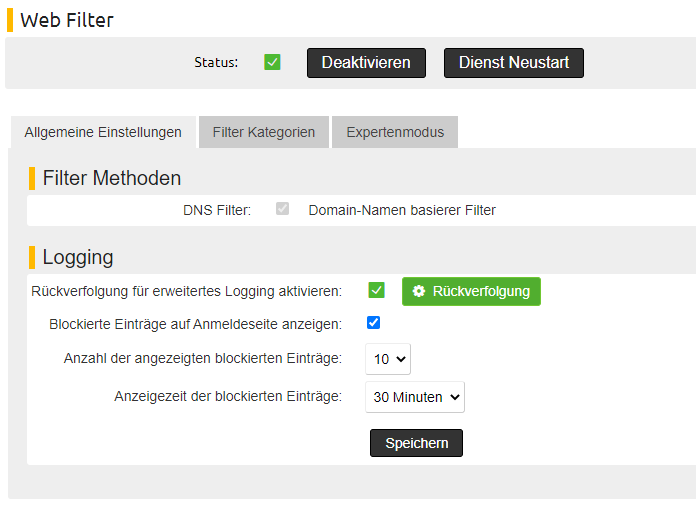
If a user requests a blacklisted page via HTTPS, the browser can only indicate that the page is invalid or unknown. This isn’t particularly transparent and also makes troubleshooting more difficult, for example when a domain has been listed by mistake. To address this drawback, we offer the option to list the last five to 30 domains on the login page (accessible via http://logon.now). This way, anyone can check which domains have been blocked. How many entries are stored and for how long can be configured in the WebAdmin settings. This feature is available both for standard login pages and as a Login API plugin.
Anything else?
A good filter also needs a whitelist to allow access to sites that