Login options with the IACBOX
In a constantly changing environment such as the Internet access gateway segment, it is necessary to provide a wide range of login options. The login options in the Surf-LAN Captive Portal are diverse: via accounts on popular social media portals, autologin based on IP/MAC, via integration with a hotel system (PMS), for example for automatic posting to the room bill, via SMS, or through external authentication. The purpose of this article is to take a closer look at external authentication, introduce the components, and discuss possible use cases. This is the first in a blog series presenting different methods of external authentication. We start with RADIUS.
External authentication?
External authentication (referred to as ExtAuth below) can be used both on the Surf-LAN side (IACBOX guest) and on the Office-LAN side (IACBOX administration). The protocols used for ExtAuth include LDAP, RADIUS, iPass, and MySQL, among others.
ExtAuth component: RADIUS
In this article, we look at RADIUS, a protocol used for AAA purposes (authentication, authorization, and accounting). It is a client/server protocol and provides a centralized way to manage user information.
First, we would like to clarify a few terms: Authentication is the process by which a RADIUS server verifies user information before access is granted. Authorization, on the other hand, refers to the level or scope of access after it has been granted. In our case, this is exclusively about “access granted” or “access denied,” i.e., authentication. Accounting, in turn, is used to log the user session, for example how much data was transferred or how long the session lasted.
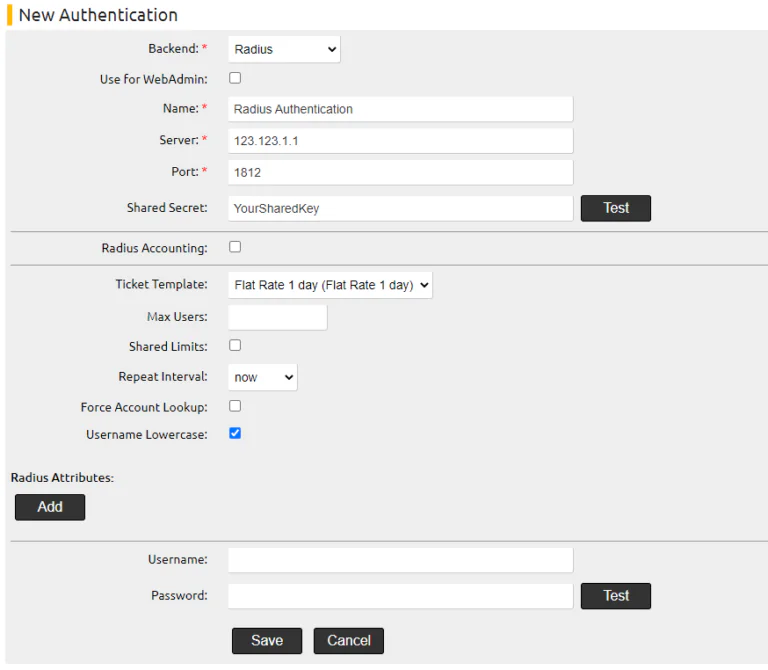
Before a RADIUS query can be initiated for authentication purposes, the IACBOX requires an access password to access the RADIUS server as a RADIUS client (IACBOX) (shared secret). Additional data such as hostname and port (default 1812) are also required in the IACBOX configuration.
If an access request is to be made, access credentials are required. This information is sent from the RADIUS client (running on the IACBOX) to the RADIUS server. The server then compares this data with its database before sending the result (access-accept or access-reject) back to the client (IACBOX).
After this check, a ticket is created based on the response (“access-accept”), which is used to bring the IACBOX Surf-LAN guest online. The properties of this ticket are based on a template that was previously defined under Ticket/Templates.
Components on the IACBOX side (RADIUS client)
ExtAuth RADIUS is configured in the Modules/Authentication menu (this requires correct licensing and activation of the service). Surf-LAN usage can be configured using “Client Authentication” by storing the corresponding ticket template. If RADIUS is to be used for login on the Office-LAN side (administrative), the “Use for WebAdmin” checkbox must be selected—unused fields are automatically hidden.
Review of possible use cases and further outlook
One possible use case for this type of authentication is any kind of login option that enables centralized administration of already registered users (employees, students, university students, clients, patients, insured persons; in a corporate environment also under the keyword BYOD), or connecting multiple sites to a central login server. Network access providers use RADIUS to manage access for DSL/dial-up connections; integration with this is also conceivable.
This should not be confused with integration via PMS (Property Management System). Such systems are used in the hotel/restaurant industry. The interfaces offered are product-specific and are covered by the IACBOX PMS module. If it is possible to use a well-defined protocol of the ExtAuth module, this is recommended in the vast majority of cases, as these are industry standards with a high level of adoption.
Other ExtAuth protocols supported include, for example, MySQL/PostgreSQL DBMS, Active Directory (Microsoft Domain Controller) & LDAP.