6 Tips for Staying Visible to Customers from the Home Office
How to Build Customer Closeness Without Direct Contact
It’s not just a way to cope with the COVID-19 crisis, but above all a work and lifestyle model of the future: home office is on the rise. Our customers increasingly value location-independent communication, with or without lockdown restrictions. This is a time we can use to get ready for it, break down barriers and obstacles, and, along the way, optimize the efficiency of our customer contacts.
6 Tips for Staying Visible to Customers from the Home Office
#1 – Customer Success Management, Part One: Is Software Maintenance Up to Date?
Anyone who proactively takes care of customer success is nurturing not only your customer relationship, but also your customer’s own success. You might call it Customer Success Management — that’s a fitting description: you make sure your customer is using the most up-to-date software version. This not only ensures their security, but also a positive user experience for their guests, and therefore their success.
With the IACBOX, this is quite simple:
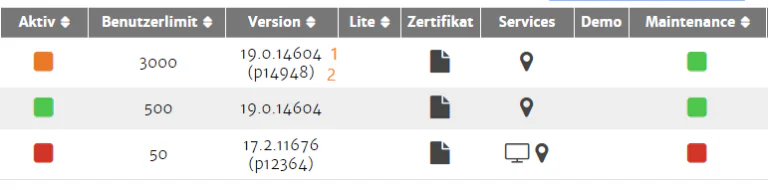
Log in to the my.iacbox partner portal, open the license manager, and check the Software Maintenance term. In the row for the relevant license, you’ll find a traffic-light-colored indicator; hovering your mouse over it shows the exact expiration date of the Software Maintenance. If it has expired, let your customer know. Software Maintenance isn’t just important for accessing the latest features at all times — it’s also a matter of security.

#2 – Customer Success Management, Part Two: Is the IACBOX Version Up to Date?
With current Software Maintenance (traffic-light indicator yellow or green), your customer can pull updates, but there’s no guarantee they actually do — they may have disabled auto-update. That’s why you should also check the version 1 and patch level number 2. If you identify a need for an update, inform the customer. In the changelog, also available in the partner portal, you’ll find details on all versions and patch levels that will help you explain why the customer should update and/or renew their Software Maintenance.
#3 – Customer Success Management, Part Three: Cloud-Based Monitoring
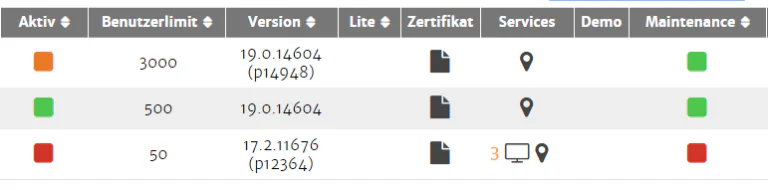
Already familiar with Central Services Connect? With this tool, which you can order retroactively for any license with valid Software Maintenance, you get cloud-based access to the IACBOX’s WebAdmin interface right from the my.iacbox partner portal. You’ll recognize this in the license manager, in the Services column, by a monitor icon 3 in the row of the respective license. Click on it to view the monitoring dashboard. You can check what’s happening on the box and whether user numbers are approaching the license’s capacity limits. If you notice this, suggest an upgrade to the customer. This helps prevent guest frustration caused by being unable to connect due to overbooking. You can also check all sorts of other parameters here and support your customers in many different ways.
#4 – Project Management: Keep Projects Moving Forward!
We all know the project-marathon dilemma: after the initial sprint at project kickoff, the energy soon fizzles out, a slump sets in, followed by a tough struggle to find a pace everyone can keep up with … and some projects never even reach the finish line, instead languishing in a drawer somewhere. Now is the moment to pull shelved projects back out and breathe new life into them. Simply ask: “So, whatever happened to …?” Summarize where things stood: “Last we spoke, we were discussing a solution for …” With a bit of luck, the project gets the decisive push it needs and starts moving again — and even if you learn it was turned down, that’s still a win. You can now cross it off the list and instead ask: “So what’s new on the agenda?”
And what if the answer is: “I’d love to keep going, but nothing’s happening on the end customer’s side”? Then take a look through our 6 Tips Against Stagnating Sales Processes, and request our project checklist from service@iacbox.com. It also asks the right questions, and you can forward it directly to your customer if needed.
#5 – Competence Management, Part One: Book a Webinar!
Lifelong learning has become a must, cutting across all industries. This is especially true in the IT industry, and particularly anything related to networks — there’s always more to learn. Many manufacturers offer online tutorials or webinars for resellers, so the product can be used to deliver the best possible value to the end customer. Free basic tutorials are often available, such as here in our training calendar, as well as more in-depth paid programs. With the IACBOX, for example, you can book webinars with content of your choice, exclusively for your company.
Tips and tricks for marketing and sales training are often available for free as well — just take a look around. When it comes to the IACBOX, you’ll find a number of articles in our blog under the keyword Sales.
#6 – Competence Management, Part Two: Put It to the Test with Your Trial or NFR License!
Did you request a trial license but never had time to try it out? Now’s the moment. You’ll find step-by-step instructions on installation and configuration in our online manuals. If it has already expired (standard validity 30 days), send us an email with your registration number and request reactivation: sales@iacbox.com.
Do you have an NFR license for your office or tech lab? Update it to the latest version and try setting up a new landing page, create new ticket templates, or switch the login method. Here, too, you’ll find guidance and ideas in our online manuals.